2026-05-19 · 14 min read
Running Qwen 3.6 locally because I kept running out of Claude Code
A field note on standing up a local LLM as a second-tier coding assistant, and an honest comparison with Claude Code.
I was on the Claude Max 10x plan for a while. It was excellent and it was also more than I wanted to spend, so I dropped down to the 5x plan. The problem with the 5x plan, for the way I work, is that I burn through the weekly quota in about two or three days. Which leaves four or five days of the week where the tool I'd most like to reach for isn't available to me.
So I did the thing a certain kind of person does when they hit a usage limit: instead of waiting, or paying more, I spent a weekend trying to make a local model do the cheap half of my work. This is a field note on how that went.
The short version: it works, it's genuinely useful, and it is not a replacement for Claude Code. It's a second string. The rest of this post is the long version.
The plan: a second tier, not a replacement
I want to be clear about the goal up front, because it changes how you read everything after it. I was not trying to replace Claude Code. I was trying to build a cheaper tier underneath it.
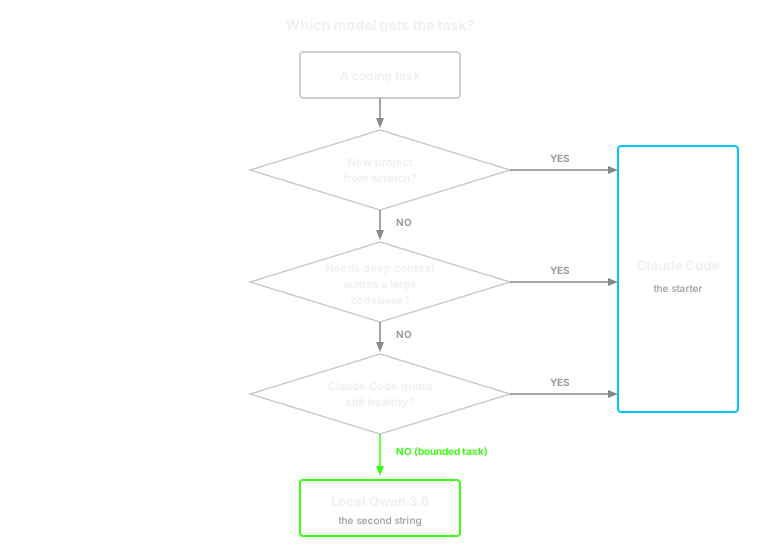
The idea was triage. Claude Code stays the starter for anything that's hard, large, or new. The local model picks up the bounded, low-stakes work so the Claude Code quota lasts the whole week instead of three days of it. "Bounded, low-stakes" means, concretely: small personal projects, and small refactors or feature additions inside projects Claude had already built.
The model I picked is Qwen3.6-35B-A3B. It's a Mixture-of-Experts model: 35B total parameters but only about 3B active per token, which is what makes it realistic to run on a desktop. My machine is a Ryzen 7 7700X, an RTX 3070 Ti with 8GB of VRAM, and 64GB of DDR5. Not a workstation. A reasonably specced gaming PC.
Getting it running
Here is the part the "run AI locally, it's free" posts tend to skip.
The plan was to use llama.cpp. The pragmatic path on Windows is to download a prebuilt binary and skip compilation entirely. So I did that. The prebuilt binaries kept failing on a max-iterations error.
Fine. Build it from source, then. That's when I met this:
-- Building for: NMake Makefiles
CMake Error at CMakeLists.txt:2 (project):
  Running 'nmake' '-?' failed with: no such file or directory
CMake Error: CMAKE_C_COMPILER not set, after EnableLanguage
CMake on Windows defaults to NMake when it can't find a real compiler, and I didn't have one. That meant installing the Visual Studio Build Tools and the "Desktop development with C++" workload. Done. Re-run.
CUDA Toolkit not foundThe NVIDIA driver is not the CUDA Toolkit. They are different things and you need the second one to build with GPU support. So: install the CUDA Toolkit. Specifically version 12.6, because 13.2 causes its own separate problems, which I knew going in and was quietly proud of avoiding.
With llama.cpp finally built, the next layer was getting Claude Code to talk to it, since I wanted to keep the same CLI rather than learn a new one. I first tried a dedicated proxy for that, and the version I picked didn't work with the version of Claude Code I was on. After some thrashing I found that I didn't need a separate proxy at all: recent llama.cpp exposes an Anthropic-compatible endpoint directly, and Claude Code can be pointed straight at it with environment variables. That's the setup I've used since, and the next section is exactly what it looks like.
I am not going to pretend this was a clean afternoon. It was most of a weekend, and a good chunk of it was installing build toolchains for an operating system that does not want you compiling C++ on it. The model is free. The Saturday was not.
If you take one practical thing from this section: on Windows, exhaust the prebuilt-binary path properly before you commit to building from source. I gave up on it too early, and building from source pulled in two large installs I didn't strictly need.
The scripts I landed on
If you want to skip the saga and just copy what works, here's the setup as it currently runs on my machine. Three pieces: one script to start the model, one config edit, one wrapper to point Claude Code at it.
A few caveats before you copy. These are tuned for my hardware (Ryzen 7 7700X, RTX 3070 Ti 8GB, 64GB DDR5) and for a 256K context window. Paths, the model file, and the thread count are the things you'll most likely need to change. The model itself is the Unsloth UD-Q4_K_XL quant of Qwen3.6-35B-A3B. And one moving-target warning: llama.cpp renamed some flags recently. If you're on a very new build, -ot ".ffn_.*_exps.=CPU" is now also expressible as --n-cpu-moe, and --parallel 1 as -np 1. The script below uses the older spelling, which still works on current builds; if a flag is rejected, check the renames first.
1. Start the model. Save this as start-qwen.ps1:
llama-server.exe `
  -m "C:\models\qwen3.6-35b\Qwen3.6-35B-A3B-UD-Q4_K_XL.gguf" `
  --alias "unsloth/qwen3.6-35b-a3b" `
  --port 8001 `
  -ngl all `
  -ncmoe 999 `
  -fa on `
  -c 262144 `
  -n 65536 `
  --no-context-shift `
  --cache-type-k q8_0 `
  --cache-type-v q8_0 `
  -t 8 -tb 8 `
  -b 2048 -ub 512 `
  -np 1 `
  --jinja `
  --reasoning-format deepseek `
  --reasoning on `
  --temp 0.7 --top-p 0.8 --top-k 20 --min-p 0.0 --presence-penalty 1.5 `
  --mlock `
  --no-mmap `
  --metrics `
  --host 127.0.0.1
The two flags that matter most here. -ot ".ffn_.*_exps.=CPU" is the MoE split: it keeps the attention layers on the GPU and pushes the expert FFN tensors out to system RAM, which is the only reason a 35B model fits on an 8GB card at all. --jinja is mandatory. Without it, Qwen's tool calls come back with empty arguments and Claude Code fails silently mid-task. --parallel 1 is there because Claude Code likes to spawn concurrent sub-agents, and anything above 1 forces a full context re-prefill on Qwen.
If llama-server.exe is not recognized when you run the script, the binary's directory isn't on your PATH. Add it (something like C:\llama.cpp\build\bin\Release) to the system PATH and restart the shell.
2. Get past the login prompt. Claude Code wants to authenticate. Add these two lines to %USERPROFILE%\.claude\settings.json:
{
  "hasCompletedOnboarding": true,
  "primaryApiKey": "sk-dummy"
}
These are safe to keep permanently. sk-dummy is only ever used as a fallback, and the wrapper in the next step overrides it anyway. Your real Anthropic sessions are unaffected.
3. Point Claude Code at the local model. This is the part I like. Rather than editing settings.json to switch targets, use a wrapper script that sets the environment variables for one process only. Save this as clocal.ps1 somewhere on your PATH:
# ── Local model endpoint (via python proxy) ──────────────────────────────────
$env:ANTHROPIC_BASE_URL              = "http://127.0.0.1:9090"
#$env:ANTHROPIC_BASE_URL              = "http://127.0.0.1:8080"
$env:ANTHROPIC_AUTH_TOKEN            = "local"
$env:ANTHROPIC_API_KEY               = ""

# ── Model aliases — route all tiers to Qwen3.6 ───────────────────────────────
$env:ANTHROPIC_MODEL                 = "unsloth/qwen3.6-35b-a3b"
$env:ANTHROPIC_DEFAULT_OPUS_MODEL    = "unsloth/qwen3.6-35b-a3b"
$env:ANTHROPIC_DEFAULT_SONNET_MODEL  = "unsloth/qwen3.6-35b-a3b"
$env:ANTHROPIC_DEFAULT_HAIKU_MODEL   = "unsloth/qwen3.6-35b-a3b"

# ── Performance / local model fixes ──────────────────────────────────────────
$env:CLAUDE_CODE_ATTRIBUTION_HEADER  = "0"       # prevent KV cache invalidation
$env:CLAUDE_CODE_MAX_OUTPUT_TOKENS   = "65536"   # match llama-server -n flag
$env:CLAUDE_CODE_MAX_TOOL_USE_CONCURRENCY = "1"  # single-slot server, no concurrency

# ── Shell ─────────────────────────────────────────────────────────────────────
$env:CLAUDE_CODE_USE_POWERSHELL_TOOL = "1"       # use PowerShell instead of bash

# ── Timeouts ─────────────────────────────────────────────────────────────────
$env:API_TIMEOUT_MS                  = "1200000" # 20 min — local inference is slow
$env:BASH_DEFAULT_TIMEOUT_MS         = "300000"  # 5 min default for shell commands
$env:BASH_MAX_TIMEOUT_MS             = "1200000" # 20 min max the model can request

# ── Disable unnecessary calls to local server ─────────────────────────────────
$env:DISABLE_PROMPT_CACHING          = "1"
$env:DISABLE_NON_ESSENTIAL_MODEL_CALLS = "1"
$env:DISABLE_TELEMETRY               = "1"

# ── Auto-compaction ───────────────────────────────────────────────────────────
$env:CLAUDE_AUTOCOMPACT_PCT_OVERRIDE = "70"

claude @args
Now clocal runs Claude Code against local Qwen, and plain claude still runs it against Anthropic. The environment variables only exist for the lifetime of the clocal process, so closing the session resets everything. No mode switching, no config file to remember to revert.
CLAUDE_CODE_ATTRIBUTION_HEADER = "0" is the one line in there that's load-bearing and non-obvious. With the attribution header on, the inference server's prefix cache gets invalidated on every turn, and you pay a full re-prefill each message. Turning it off is the difference between "usable" and "unbearably slow."
The daily flow ends up being: run start-qwen.ps1 once, leave it running, and use clocal instead of claude whenever I want the local model.
What it's actually like to use
Once it runs, it runs. Here's what using it is actually like.
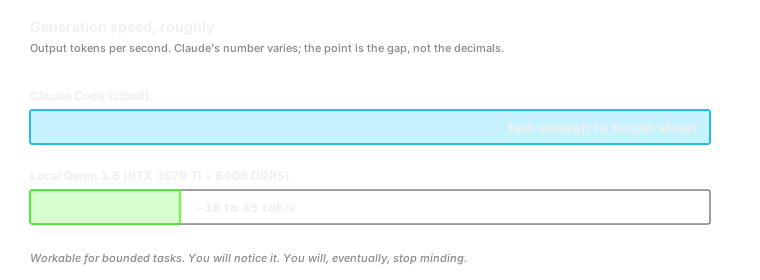
Speed. I get somewhere between 38 and 45 tokens per second. Coming straight from Claude Code, that is an adjustment. Claude Code is fast enough that you stop thinking about it; the local model is fast enough to use but slow enough to notice. It's the difference between a conversation and a correspondence. You get used to it, mostly.
Prompting. Qwen needs you to be specific and detailed in a way Claude Code doesn't. With Claude Code I can be a little lazy, describe the goal, and trust it to fill in reasonable intent. If I do that with local Qwen, it loses track of what it's doing, wanders off, and confidently implements something I didn't ask for. The model rewards a precise prompt and punishes a vague one, hard. Once I internalised that and started writing detailed instructions, the hit rate went up a lot. That's the main behavioral difference.
Where it genuinely works. Two real things I've built with it, both squarely in the "bounded, low-stakes" bucket:
- An ad-generation system that pulls data from my own projects and produces ad creatives and copy I can use for Google and Meta campaigns.
- A shopping comparator that takes multiple product links and gives me a local side-by-side view of products from different e-commerce sites. This one I actually use right now: I'm furnishing a new home and comparing the same shelf across four sites is otherwise miserable.
Neither of these is a hard project. Both are exactly the kind of work I built the second tier for, and Qwen handled them well.
Where it doesn't. I have not had much luck starting a full project from scratch on local Qwen. The simpler stuff works; greenfield does not, at least not yet. I should add the honest caveat that I haven't tried the various context and prompting techniques people use to get more out of local models. There's room above where I am.
The clearest single failure: I tried to use it to test one of my apps in an automated way through mobile-mcp, and it kept getting confused about which screen the app was currently on. The kind of mistake that comes from losing the thread of state across a sequence of steps.
Claude Code vs Qwen, honestly
If Claude Code is a 10 for my work, local Qwen is realistically a 6.
That's not a dismissal. A 6 that costs nothing and is always available is worth having. But the number is honest, and it's worth saying where the four points go.
Where Claude Code wins.
- Sustained context. This is the real gap. On a larger codebase, Claude Code holds the thread; local Qwen keeps losing it. As project size grows, the difference stops being subtle.
- Starting from nothing. Greenfield work needs the model to hold a lot of loosely specified intent at once. Claude Code does this well. Local Qwen, in my experience so far, does not.
- Speed. Covered above. Claude Code is in a different class.
- Forgiveness. Claude Code tolerates a lazy prompt. Local Qwen does not. That tolerance is worth more than it sounds.
Where local Qwen wins.
- No quota. This is the entire reason it exists, and it delivers on it. There is no weekly limit and no meter running while I think.
- No per-token anxiety. I'll run something speculative on local Qwen that I'd hesitate to spend cloud budget on. That changes which experiments feel worth doing.
- Privacy. The code never leaves the machine. For some work that matters more than for other work.
- Good enough for bounded tasks. For the work I actually pointed it at, the 6 is plenty. The ad generator and the comparator don't need a 10.
The pattern underneath all of this: the gap is a context-tracking gap. On small, well-specified, bounded tasks, Qwen and Claude Code are closer than the 6-versus-10 makes them sound. As the task gets bigger and needs the model to carry more state, the gap widens fast. The routing rule writes itself.
Where I landed
Local Qwen is not my daily driver, and I'm not going to pretend it's on a path to becoming one. Claude Code and Codex remain the tools I reach for first.
What it is, is a real second tier that runs alongside them. When the Claude Code quota is healthy, I use Claude Code. When it isn't, and the task in front of me is small and well-specified, local Qwen picks it up instead of the work just stopping. That is exactly the job I set out to fill, and it fills it.
Worth noting: this is a first-impressions read. I haven't tried the prompting and context techniques people use to push local models further, and Qwen3.6 itself will keep improving. The 6 might be a 7 in a few months, same hardware with more tuning. I'll find out.
Close
If you're hitting the same wall I was, here's the practical summary. A local model on a normal gaming PC is a real option for the cheap half of your work. It'll cost a weekend to set up and force you to write tighter prompts. Won't replace a good cloud agent. Treat it as a second tier, point it at bounded tasks, and it earns its spot.
Now I just have to stop running out of quota on the other four days.